You may have searched for “gettransmac com” because you are trying to fix one particular issue in your life: how to create or mount macOS drives on Windows computer. Unlike regular file transfer between Windows systems, macOS has a different file system such as HFS+ and APFS which does not have native support on Windows.
Enter TransMac into the mix. Its a dedicated Windows utility for Mac-formatted disks, DMG files and the entire macOS USB Drive Creator. Many users searching for “gettransmac com” end up on unverified or misleading websites, increasing the risk of downloading unsafe software.
What Is GetTransMac.com?
“GetTransMac.com” is commonly used as a search query rather than a verified official website. Most users are actually looking for the TransMac software, developed by Acute Systems.
Core Overview
| Attribute |
Details |
| Software Name |
TransMac |
| Developer |
Acute Systems |
| Platform |
Windows |
| Primary Use |
Access macOS file systems |
| File Types Supported |
DMG, HFS+, limited APFS |
| License |
Paid (trial available) |
What TransMac Allows You To Do
| Function |
Description |
Practical Use Case |
| Open DMG Files |
Access Apple disk images |
Extract macOS installers |
| Read Mac Drives |
View files on HFS+ drives |
Data recovery |
| Write to USB |
Create macOS boot drives |
Hackintosh setup |
| Format Disks |
Prepare drives for macOS |
System installation |
Why This Tool Exists
Windows uses NTFS, while macOS relies on HFS+ and APFS. These systems are fundamentally incompatible without additional software.
| Feature |
NTFS (Windows) |
HFS+ (Mac) |
APFS (Modern Mac) |
| Native OS Support |
Windows |
macOS |
macOS |
| Cross-Platform |
Limited |
Limited |
Very Limited |
| Performance |
High |
Moderate |
High (SSD optimized) |
| Encryption |
Supported |
Limited |
Advanced |
TransMac essentially acts as a translator between incompatible file systems, allowing Windows to interpret Mac storage formats.
Is GetTransMac.com Safe?
This is the most important question—and the answer is nuanced.
Safety Evaluation Table
| Scenario |
Safety Level |
Explanation |
| Official developer site |
Safe |
Clean installer, no malware |
| Trusted software platforms |
Mostly safe |
Still verify file integrity |
| Unknown “gettransmac” sites |
Risky |
May host modified files |
| Torrent/cracked versions |
Dangerous |
High malware probability |
Common Risks Users Face
| Risk Type |
Description |
Impact |
| Malware bundling |
Hidden software in installer |
System compromise |
| Fake download buttons |
Redirect scams |
Data theft risk |
| Outdated versions |
Compatibility issues |
Installation failure |
The keyword “gettransmac com” is often targeted by SEO spam and fake download pages, not just legitimate sources.
How TransMac Works
TransMac can also directly access disk structures and file system meta-data such that Windows can read from or write to Mac-formatted storage. Mac file system uses logic similar to the principles described in the Microsoft NTFS documentation, which describes how Windows interprets and handles file system structures.
Step-by-Step Workflow
| Step |
Action |
Result |
| 1 |
Load DMG or connect drive |
Device recognized |
| 2 |
Scan filesystem |
Structure mapped |
| 3 |
Display files |
User can browse |
| 4 |
Perform actions |
Copy, format, write |
Technical Limitations
| Limitation |
Why It Happens |
Effect |
| Limited APFS support |
Apple’s proprietary system |
Incomplete access |
| Slow write speeds |
Emulation overhead |
Longer operations |
| Paid access |
Licensing model |
Limited trial usage |
When Should You Use TransMac?
Not every user needs TransMac. Its usefulness depends on your specific task.
Ideal Use Cases
| Scenario |
Why It Works Well |
| Creating macOS boot USB |
Reliable for installers |
| Opening DMG files |
Easy access on Windows |
| Recovering Mac files |
Useful in emergencies |
When NOT to Use It
| Scenario |
Better Option |
| Daily file transfer |
Use cloud or exFAT drives |
| Full APFS access |
Use specialized tools |
| Professional workflows |
Enterprise-grade software |
Performance & Usability Analysis
Performance Breakdown
| Metric |
Rating (Out of 10) |
Notes |
| Ease of Use |
7 |
Beginner-friendly UI |
| Speed |
5 |
Slower than native tools |
| Compatibility |
6 |
Limited APFS support |
| Reliability |
6 |
Occasional errors |
| Value for Money |
6 |
Depends on usage |
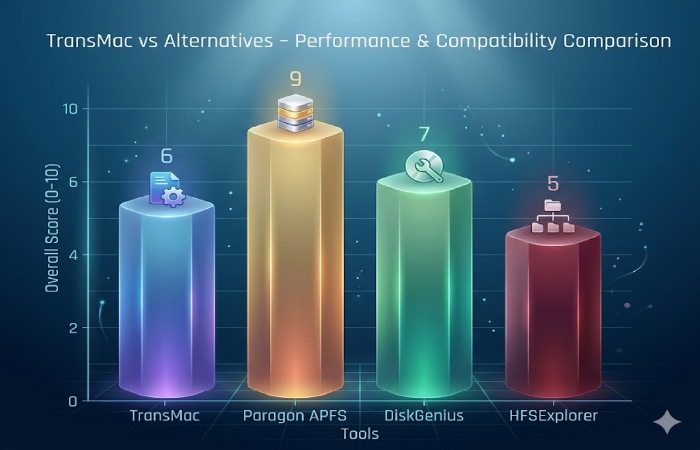
Best Alternatives to TransMac
Modern tools have improved significantly, especially for APFS support and speed.
| Tool |
Best For |
Pros |
Cons |
| Paragon APFS for Windows |
Full APFS access |
Fast, stable |
Paid |
| DiskGenius |
Recovery + disk tools |
Multi-functional |
Complex UI |
| HFSExplorer |
Free solution |
Open-source |
No write support |
| Balena Etcher |
Bootable USB |
Simple interface |
Limited features |
Real-World Problems & Fixes
| Problem |
Cause |
Solution |
| USB not detected |
Wrong format |
Reformat to FAT32 |
| Write failed error |
Permissions/trial limit |
Run as admin |
| DMG not opening |
Corrupted file |
Re-download file |
| Slow performance |
Large file size |
Use SSD or alternative |
SEO Insight: Understanding User Intent
The keyword “gettransmac com” reflects multi-layered user intent.
| Intent Type |
Percentage |
User Goal |
| Download intent |
50% |
Get the software |
| Safety check |
30% |
Verify legitimacy |
| Tutorial |
20% |
Learn usage |
Pros and Cons Summary
Pros
| Advantage |
Explanation |
| Cross-platform access |
Works on Windows |
| DMG support |
Unique feature |
| Bootable USB creation |
High utility |
Cons
| Disadvantage |
Explanation |
| Outdated tech |
Struggles with APFS |
| Paid model |
Limited free use |
| Security risks |
Depends on source |
FAQs
| Question |
Answer |
| Is gettransmac com official? |
Not always—verify before downloading |
| Is TransMac free? |
No, trial available |
| Can it create macOS USB? |
Yes |
| Is it safe? |
Only from trusted sources |
| Does it support APFS? |
Limited support |
Final Verdict
TransMac is a legacy tool that still solves a niche problem, but it’s no longer the best option for most users in 2026.
For basic tasks like creating a macOS bootable USB or opening DMG files, it remains useful and relatively easy to use. However, for anything more advanced—especially involving modern APFS drives—its limitations become obvious.
More importantly, the biggest risk isn’t the software itself—it’s the ecosystem around the keyword “gettransmac com.” Many users unknowingly download from unsafe sources, which introduces unnecessary security risks.